Skills
This page shows you how to activate skills that give the AI extra capabilities.
What are skills
Skills are specialized modes you activate to unlock specific behaviors. Want the AI to generate images? Activate a skill. Need it to build accessible forms? There's a skill for that.
Think of skills as telling the AI what kind of work you want it to focus on.
How to activate skills
Type / in the chat input to open the skill menu. Select the skill you want to activate.
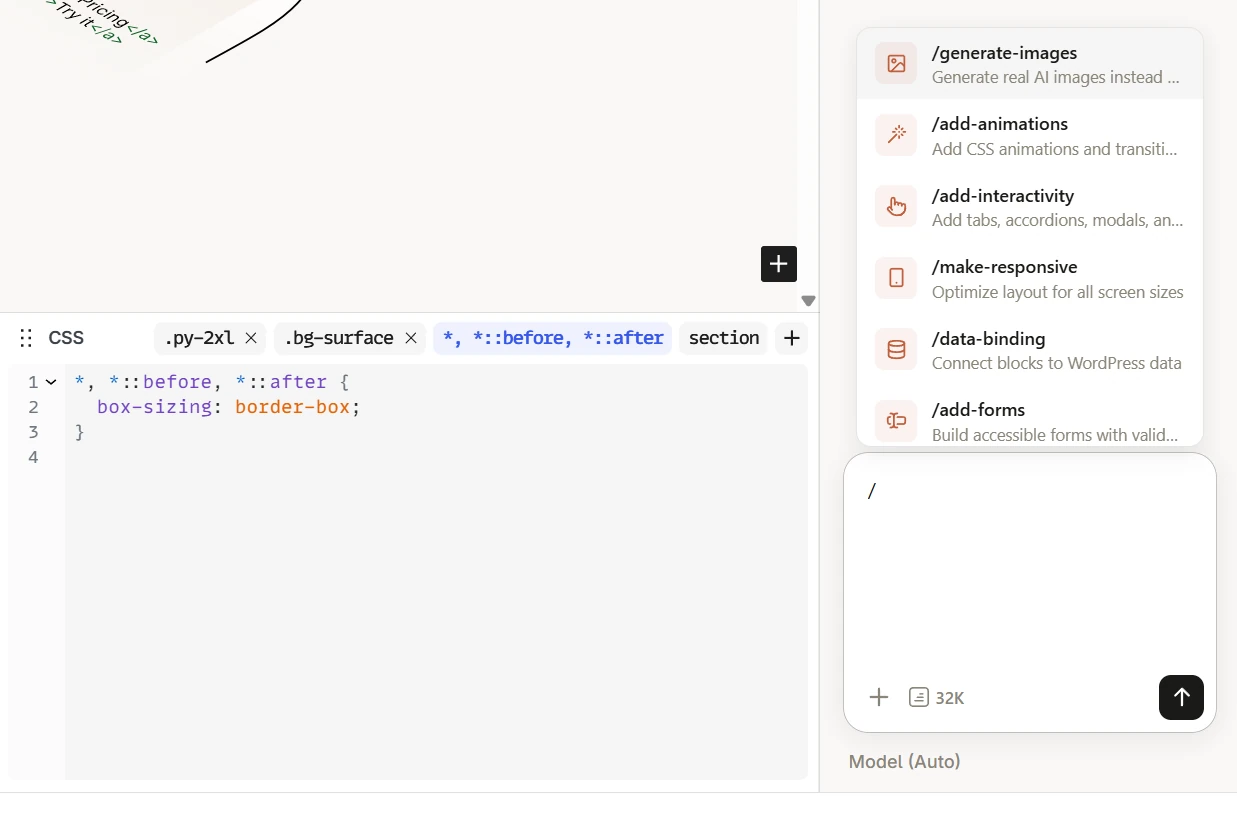
You can activate multiple skills at once — they stack. Skills stay active until you clear them.
Building skills
These skills add new capabilities to the AI's output.
Generate images
The AI creates images instead of using placeholders. Describe what you want and it generates and inserts the image directly into your page.
The skill only appears when your provider supports image generation and you are allowed to upload files to the media library (Authors and above by default).
Add animations
CSS animations, transitions, and scroll-triggered reveals. The AI adds motion to your blocks based on your description.
Add interactivity
Tabs, accordions, modals, carousels — with keyboard accessibility built in. The AI creates interactive components that work without plugins.
Make responsive
Optimizes your layout for mobile, tablet, and desktop. The AI adjusts spacing, font sizes, and layout direction for different screen sizes.
Data binding
Connects blocks to WordPress data — post title, excerpt, featured image, custom fields, and loops. The AI wires up dynamic content so your templates pull from real data.
Add forms
Builds accessible contact forms with validation. Name fields, email fields, textareas, file uploads — the AI creates the markup and handles the basics.
Audit skills
The AI checks your page and gives you a report. If you ask it to fix the issues it found, it can — but the primary intent is to audit, not to modify.
Audit accessibility
Reviews your page for WCAG 2.2 AA compliance issues. Missing alt text, poor color contrast, incorrect heading order — the AI flags problems and tells you how to fix them.
Audit SEO
Reviews heading structure, semantic HTML usage, and content optimization. The AI identifies issues that could affect search engine visibility.
Combining skills
You can activate multiple skills for a single request. The AI takes all active skills into account when generating its response.
Examples:
- Activate Add animations + Make responsive, then ask: "Create an animated hero that works on mobile"
- Activate Data binding + Add interactivity for a dynamic tabbed content section that pulls from WordPress data
Skills add context to the AI's instructions, which uses more tokens. Only activate the skills you need for the current task — don't turn them all on at once.
Next steps
- Prompting Tips — write better prompts for each skill
- Agents — pair the right agent with the right skills