Private Data
Some data is private: expressions read nothing from it until the site opens it. It does not matter who wrote the expression or who views the page: an administrator's expression reading an email shows nothing either, until the email is opened.
What is private
| Data | Example |
|---|---|
| Users' email | {{ author.user_email }} |
| Users' username | {{ author.user_login }} |
Users' roles, and can() on another user | {{ author.roles }} |
| Users' registration date | {{ author.user_registered }} |
| User meta, except the names, nickname, bio and the user fields of ACF, Meta Box, Pods and JetEngine | {{ author.meta('billing_phone') }} |
| Users without a published post (customers, subscribers) | {{ get_user(12).display_name }} |
| The site's admin email | {{ site.admin_email }} |
| Media file paths on the server (only a developer filter opens them) | {{ image.file_loc }}, {{ image.pathinfo.dirname }} |
| Posts of a post type WordPress shows nowhere to the public (no pages of its own, left out of search) | {{ get_post(42).title }} |
Everything else is public: titles, content of posts the visitor can read, authors' display name, avatar, website and bio, terms, images, and so on.
A logged-in user always reads their own data: {{ user.user_email }} shows the visitor their own email.
Some data is never readable, whatever you open: password hashes, password reset keys, session tokens, post passwords and the content they protect, and the email and IP of comment authors.
Opening private data
Open the Unblock manager, then Settings > Privacy:
- Post types: the post types WordPress shows nowhere to the public, whose published posts expressions may then read and loops may list.
- Users:
- Email, Username, Registration date, Roles. Roles also lets user loops filter by any role.
- Public roles: the roles whose members can be read without a published post; a user loop filtered on these roles lists them, as in a member directory.
- Public meta keys: other meta keys any expression may read, such as a plugin's; the user fields of ACF, Meta Box, Pods and JetEngine are already readable, but to filter a user loop on one, add it here.
- Site: Admin email.
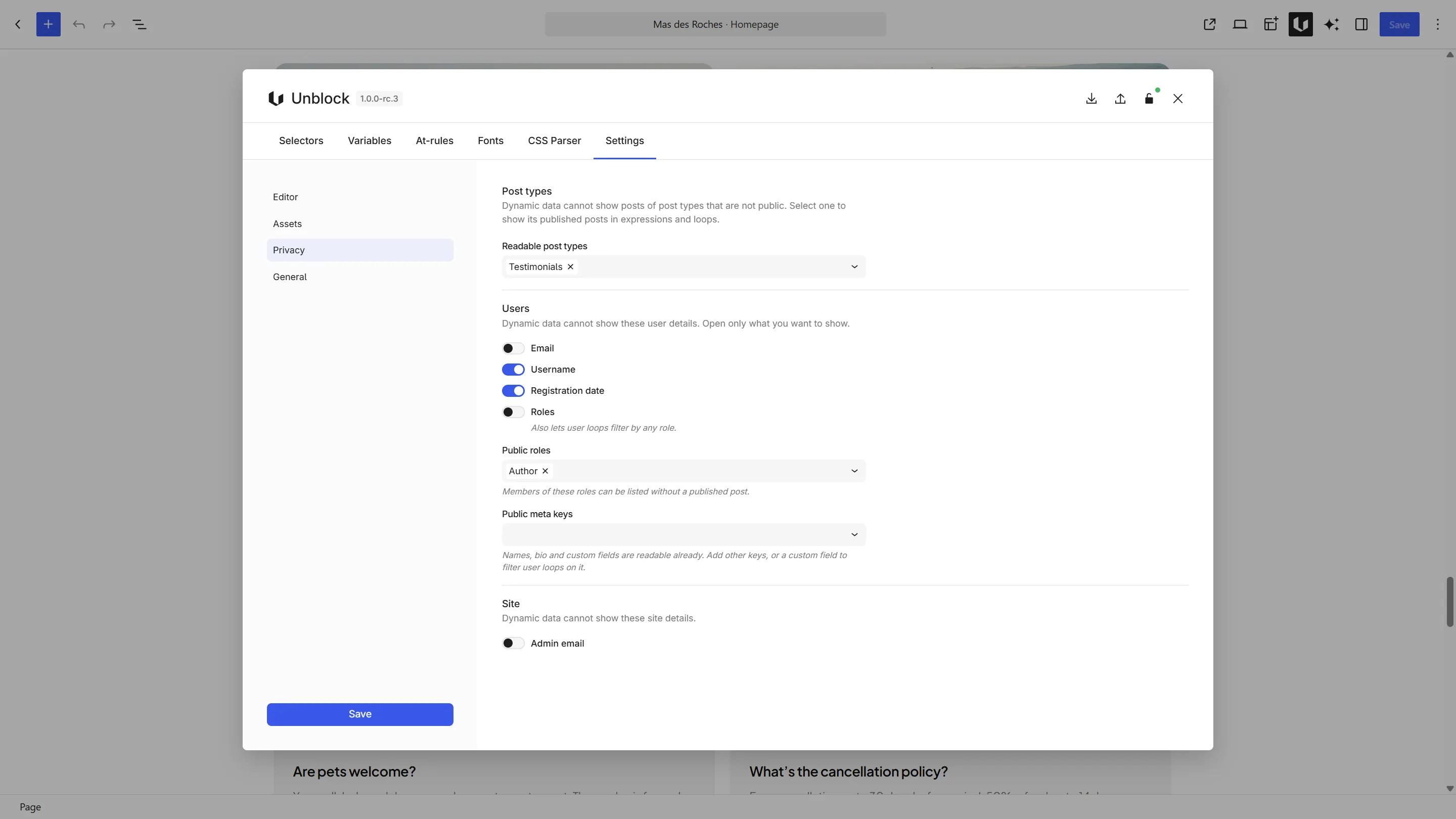
Opening the email lets any expression show the email of the site's authors, whoever writes it. Open only what you mean to publish.
Opening a field never reaches users who are still private: opening the email shows the emails of authors with a published post, never those of your customers, unless you also make their role public.
User loops
User loops and get_users() list authors with a published post. To list the members of a role, such as a member directory, make the role public in Settings > Privacy and filter the loop on it.
- Filtering on another role, or on a capability, returns no user until Roles is opened.
- Searching or sorting on a private field (email, username, registration date) uses public fields instead: users are sorted by name by default.
- A filter on a private user meta key returns no user until the key is opened.
Hidden post types
A post type is readable when WordPress shows it to the public: it has its own pages, or it is in the site's search (WordPress lists its posts on the search page), as testimonials or team members usually are. A post type WordPress shows nowhere (no pages of its own and left out of search), such as internal data, is private: its posts show nothing in expressions and loops don't list it. Open it in Settings > Privacy > Post types: its published posts can then be read and looped. Drafts and private posts still show only to users who can read them.
WooCommerce variations are open already: a published variation of a published product reads as WooCommerce shows it to customers, so post.variations works on a product page.
For developers
Developers can open data with filters, more finely than the settings:
unblock/data/allowed_fieldopens a private field for some objects only, such as the email of editors.unblock/data/allowed_useropens a user without a published post.unblock/data/allowed_meta_keysopens meta keys; a user meta key registered withshow_in_restis public too.unblock/data/allowed_post_typesopens post types WordPress shows nowhere to the public.unblock/data/allowed_postopens or closes one post.
Next steps
- User provider — all user fields
- Query Users — user loops
- Custom Fields — field plugins and meta keys